
On this page
Your needs, this model
Does it fit your priorities?
Will the refrigerator plan need a single 120 V AC station with the published 10 ms UPS transfer figure?
The FridgePower station in this bundle is 120 V, rated at 1,800 W continuous and 2,016 Wh, with a manufacturer-published transfer time no greater than 10 ms; the manual cautions against high-performance server/workstation UPS use.
Explore this need in the finder →Do you want solar input plus the option to expand to 8,064 Wh nameplate capacity?
The station supports up to 1,000 W solar input and three optional BlueCell 200 modules for up to 8,064 Wh. This exact bundle includes Display 1, but no solar panel or expansion battery.
Explore this need in the finder →Must this exact package include the separate external status display?
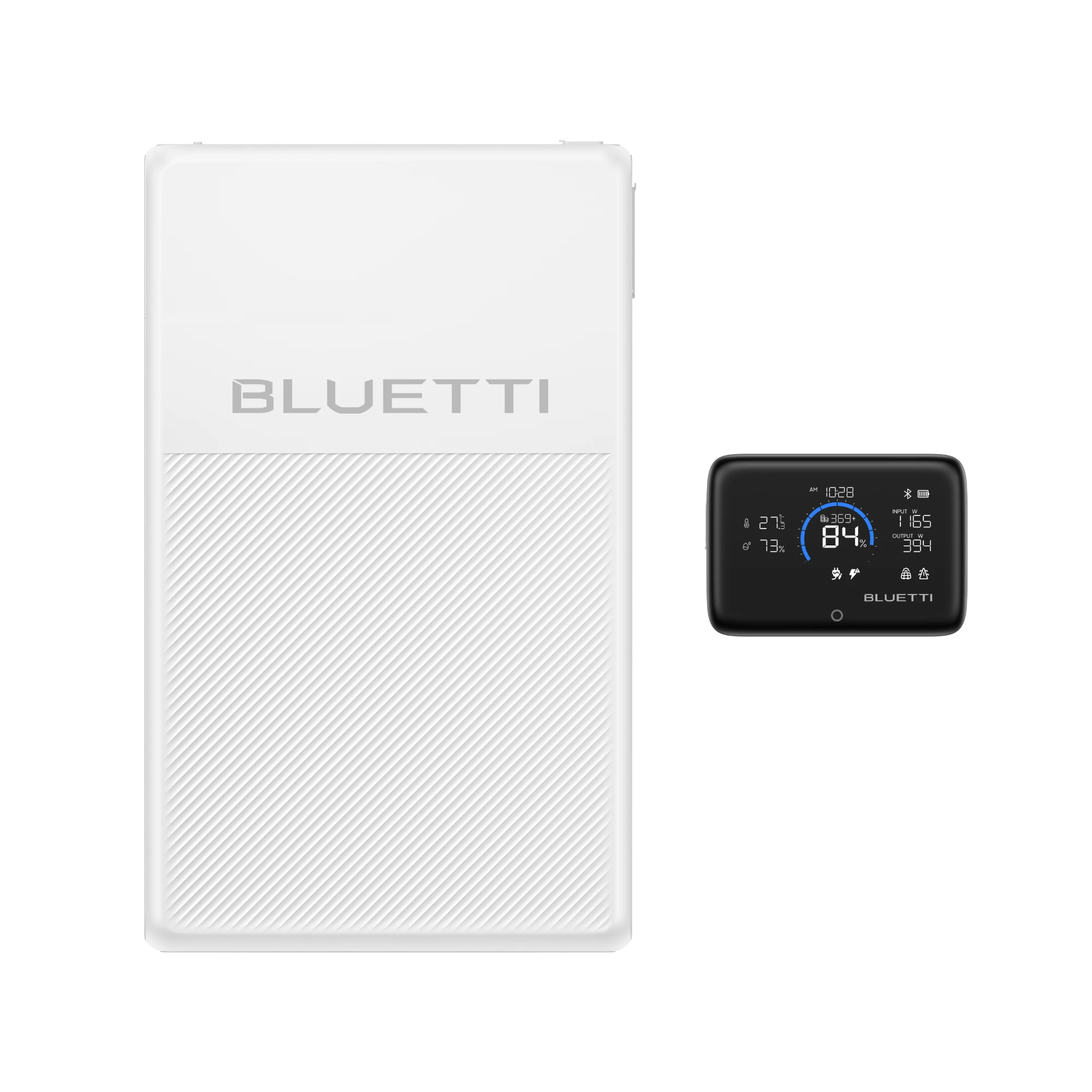
The selected U.S. variant is FridgePower+Display 1; BLUETTI's variant-specific offer record and selected image identify the external screen as part of this bundle.
Explore this need in the finder →This is the U.S. BLUETTI FridgePower + Display 1 offer, Shopify variant 48950687400155, SKU FRPOWER-2-05-SPFUS-00. The package pairs the 2,016 Wh FridgePower station with BLUETTI's separate magnetic status screen. It is a small but useful configuration distinction: the screen can be placed where it is convenient to glance at, while the heavy, thin station remains near the refrigerator or on its approved wall mount. It does not add battery capacity or another power output.
The remote screen is the point of this bundle
FridgePower itself is rated at 1,800 W continuous, 3,600 W surge and 120 V AC in the U.S. BLUETTI specifies a UPS changeover no slower than 10 ms. Its external Display 1 connects to the station over Bluetooth and shows operating status; the FridgePower manual describes viewing real-time information after pairing. That is most helpful when a wall-mounted installation, cabinet-side placement or the room layout puts the station's own LCD out of sight. It brings the status view nearer to the person checking the appliance without requiring the battery to sit on the kitchen floor.
The station's built-in screen is already part of the base unit. This package pays for convenience of a separate viewing point, not a different inverter or a second control center. Treat the screen as a status accessory, not as a battery, remote power source or substitute for reading the station's alerts and app settings. A buyer who is happy to walk to the unit or use the BLUETTI app can compare the lower-accessory base FridgePower offer; both choices retain the same main electrical limits.
What remains unchanged from the base station
The station provides 2,016 Wh of LiFePO₄ storage, 1,800 W continuous U.S. AC output at 120 V, 3,600 W surge and a published UPS transfer of at most 10 ms. The nameplate battery capacity is not the energy an appliance will receive at its plug, and no fixed refrigerator runtime follows from the 2,016 Wh figure. Compressor cycling, ambient temperature, aging, stored charge and conversion loss all matter. BLUETTI's manual also says not to use this unit for data servers or workstations that need a high-performance UPS. If a transfer time or load tolerance is critical, confirm the appliance's requirements rather than treating “UPS” as a universal compatibility guarantee.
Adding Display 1 does not change the station into a 240 V or split-phase system, add TT-30 output, increase its 1,800 W continuous rating, or include an expansion battery. The FridgePower supports up to three optional BlueCell 200 batteries for a maximum combined nameplate capacity of 8,064 Wh, but none is part of this SKU. Solar input is rated up to 1,000 W at 12–60 V and 20 A; the exact bundle includes no solar panel. Its station-side cable and input limits still need to govern any future array. The exact bundle page and the selected-option image establish that Display 1 is included, not a photovoltaic kit.
Fit it as stationary indoor backup
The FridgePower is only 3.07 in thick, but the station is about 43.43 lb and measures 22.83 × 13.78 in. The manual documents wall mounting and flat placement, specifies clearance around the body and warns that the handle arrangement is not intended for routine mobile use. Plan the installation before lifting: confirm a suitable support, ventilation space, outlet access and a safe location for the cables. IP20 protection and the manual's warning against rain or high humidity point to indoor placement. The bundled screen may improve visibility from elsewhere in the room, but it does not make the station weatherproof, lighter or more suitable for repeated transport.
Where its limits matter
This is not a universal charging hub. The manual's station output specification is AC, and its connection map does not document a set of native USB or 12 V load ports; the expansion connector is for certified battery accessories. If your essentials include a USB-C laptop, a 12 V cooler or car-style appliances, compare a multi-output station such as the standard AC180 and check each output before buying. The FridgePower's 1,440 W maximum U.S. AC recharge and 1,000 W maximum solar input are useful for an installed backup plan, but the included solar panel wattage is zero. This bundle's status display cannot fix a shortage of storage or charging energy.
How to decide between the two FridgePower offers
Choose this exact configuration when a separate external status display is worth having in the box, especially if the station's chosen location hides its built-in LCD. Choose the base SKU if the station will be visible or app monitoring is sufficient. The ordinary electrical questions should return the same answer for both offers: 120 V AC, 1,800 W continuous, a 10 ms UPS figure, solar-capable input and optional BlueCell expansion. In the advanced controls, requiring an external status screen identifies this bundle; requiring that the exact box omit the external screen identifies the base offer. Leaving the screen choice open is honest when it does not matter. Neither offer should pass requirements for a panel-in-box, TT-30, split phase, or a native 12 V/USB output that the sources do not establish.
Primary references: BLUETTI's selected FridgePower + Display 1 U.S. offer and FridgePower User Manual V2.0.
Key details at a glance
| Nameplate battery capacity | 2016 Wh |
|---|---|
| Rated AC output | 1800 W |
| Manufacturer surge rating | 3600 W |
| Maximum solar input | 1000 W |
| Included panels, combined nameplate | 0 W |
| Maximum USB-C output per port | 0 W |
More specifications and setup details
| Listed weight | 43.43 lb |
|---|---|
| Compatible extra-battery expansion | Yes |
| 12 V DC output | 0 W |
| Maximum AC recharge input | 1440 W |
| Manufacturer UPS transfer figure | 10 ms |
| Total rated DC output | 0 W |
| AC outlet output | Yes |
| USB-C ports | 0 |
| USB-A ports | 0 |
| Solar input ports | 1 |
| 12 V car-style output | 0 W |
| Battery chemistry | LiFePO4 |
| Ingress rating | IP20 |
| TT-30 RV outlet | No |
| Manufacturer minimum charge temperature | 0 °C |
| Manufacturer minimum discharge temperature | -20 °C |
| Expansion battery in this package | No |
| Expansion packs in exact offer | 0 |
| Solar panels in exact offer | 0 |
| Included expansion batteries | 0 units |
Use the exact model’s instructions for operating limits, supplied equipment and version differences.
Sources for this assessment

A useful match starts with the loads that matter.
Use the finder for hard electrical requirements, then check appliance starting behavior, actual run time and the exact package in the full assessment.